
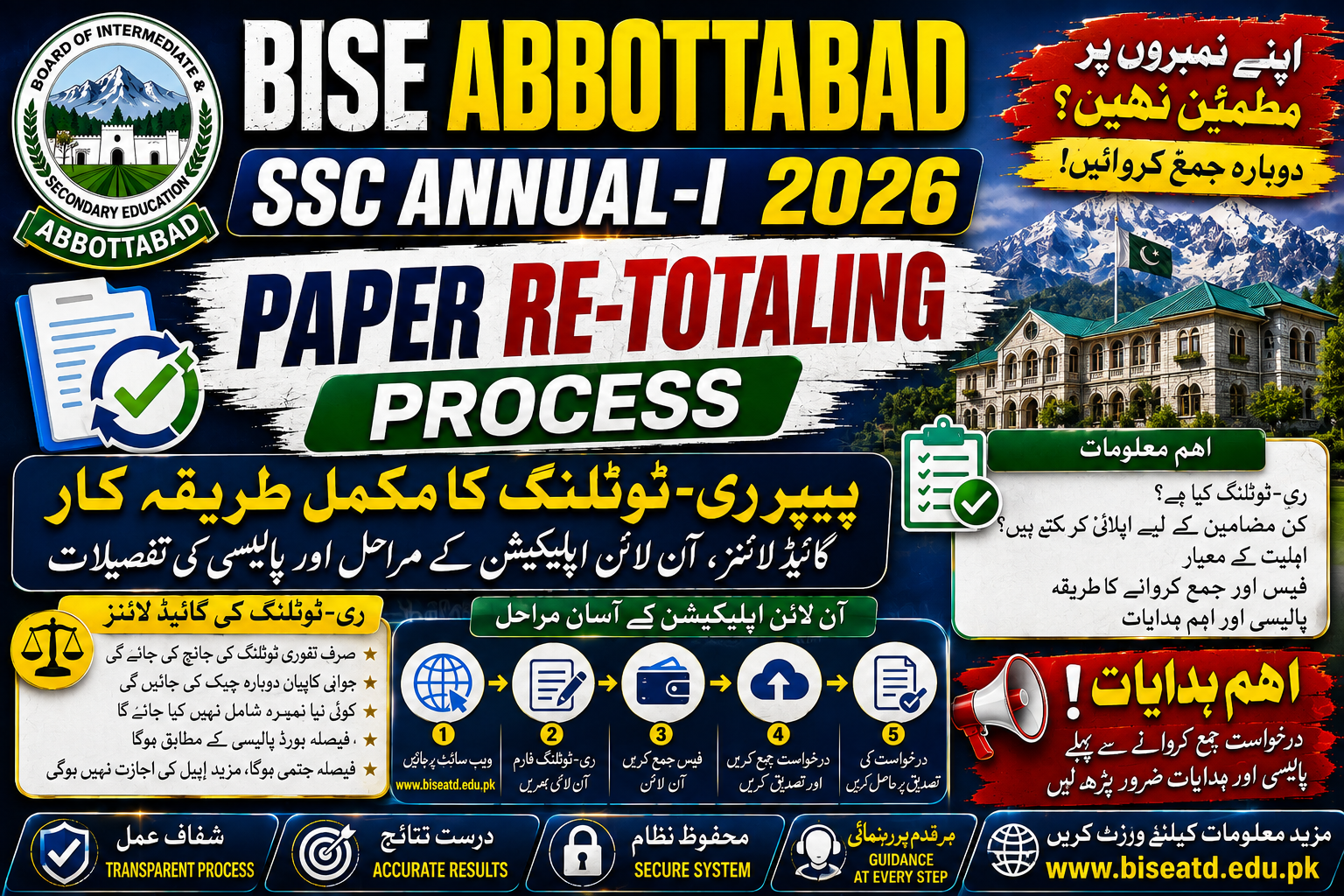
The Board of Intermediate and Secondary Education (BISE) Abbottabad has officially digitized the post-examination review system for students of Secondary School Certificate (SSC Part 1 & 2 / 9th & 10th grades). Following the release of the SSC Annual-I 2026 examination results, the board established a paper re-totaling portal to enable candidates to apply for a formal recount of their marks online.
If you suspect an error in your calculated total or feel that your overall score does not accurately reflect your performance, the online re-totaling mechanism provides a fair, transparent opportunity for correction.
Key Timelines & Result Declaration Dates
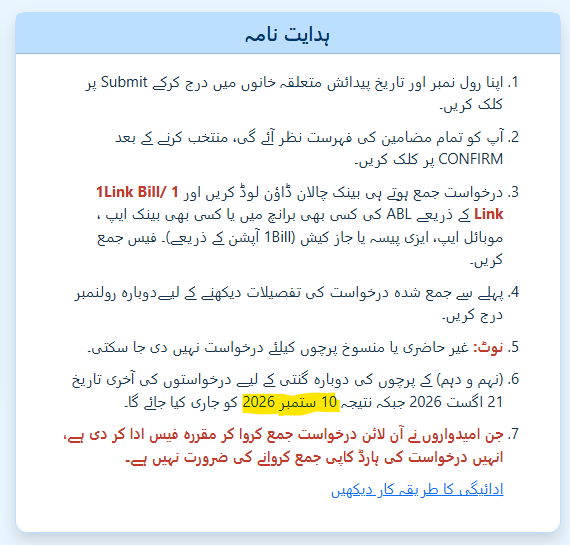
Candidates planning to submit a re-totaling request must adhere strictly to the schedule announced by the board administration. Applications submitted past the deadline are automatically rejected by the portal.
- Application Deadline: August 21, 2026
- Re-Totaling Result Announcement: September 10, 2026
Step-by-Step Guide: How to Apply Online
BISE Abbottabad has streamlined the application procedure to eliminate physical queues and paper-based submissions. Follow these steps to complete your online registration:
- Access the Portal & Provide Identification
- Go to the official BISE Abbottabad Re-Totaling Portal for SSC A-I 2026.
- Input your official Roll Number in the designated text field.
- Select or type your exact Date of Birth (format:
DD-MM-YYYY). - Enter an active Mobile Number (format:
03XX-XXXXXXX) for SMS updates and verification. - Click on Proceed.
- Select Subjects & Confirm Application
- The portal will display your full transcript alongside all registered subjects.
- Check the boxes next to the specific subject(s) you wish to submit for paper re-totaling.
- Review your selection carefully and click Confirm.
- Generate & Pay the Processing Fee
- Once confirmed, the system automatically generates a unique digital Bank Challan featuring a 1Link Bill / 1Link ID.
- You can pay the processing fee through multiple convenient channels:
- Over the counter at any Allied Bank Limited (ABL) branch across Pakistan.
- Mobile banking applications, digital wallets (EasyPaisa, JazzCash), or online banking portals using the 1Bill / 1Link payment option.
- Tracking Application Status
- To track your request status later, return to the re-totaling portal and re-enter your Roll Number to view processing updates.
Essential Policies & Rules to Remember
Before submitting your form, review these essential administrative regulations to ensure smooth processing:
- No Hard Copy Submission Required: Candidates who successfully complete the online application and pay the prescribed fee do not need to submit physical copies of the form or fee challan to the BISE Abbottabad office.
- Ineligible Papers: Papers marked as absent or canceled during the examinations are strictly ineligible for re-totaling requests.
- Re-Totaling Scope: Re-totaling covers verifying that all answer segments were assessed, recalculating the sum of marks, and ensuring correct mark entry on the official result sheet. It does not constitute a full re-evaluation or re-grading of written answers.
Fee Payment Breakdown & Options
| Payment Channel | Method | Processing Time |
| ABL Bank Branch | Physical Cash Deposit via printed Challan | Instant / Same Day |
| Mobile Banking Apps | Electronic Transfer via 1Link Bill ID | Immediate |
| JazzCash / EasyPaisa | Utility & Board Bill Payment (1Bill Option) | Immediate |
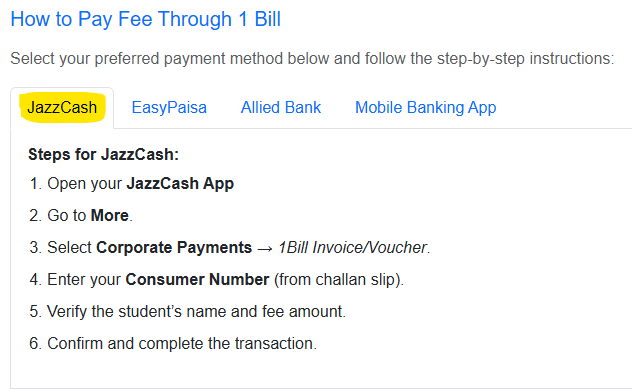
How to Pay Fee Through 1 Bill ( Payment Instructions )
JazzCash
EasyPaisa
- Open your EasyPaisa App.
- Go to Bill Payment → More Services.
- Select 1Bill Invoice/Voucher.
- Enter your Consumer Number.
- Review details and confirm payment.
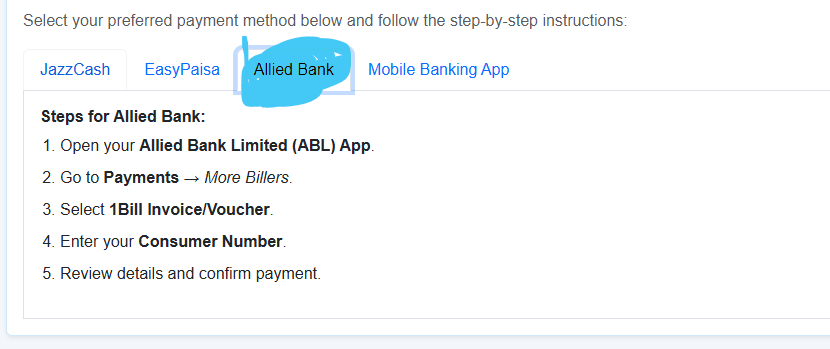
Allied Bank
Steps for Other Mobile Banking Apps:
- Login to your Mobile Banking App (HBL, UBL, Meezan, etc.).
- Navigate to Bill Payments → 1Bill Invoice/Voucher.
- Enter Consumer Number and verify details.
- Confirm transaction and save e-receipt.
Need Further Assistance?
If you encounter technical glitches on the portal or payment processing issues, contact the official BISE Abbottabad helpline:
- Official Helpline:
(0992) 392014-257 - Official Website: BISE Abbottabad Official Portal

